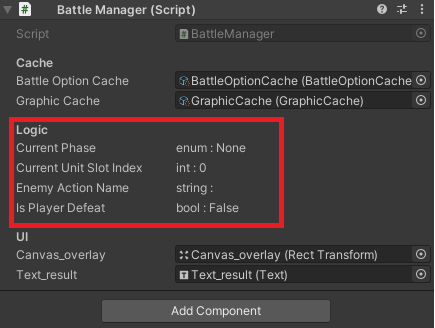

#if UNITY_EDITOR 에 대해서는 플랫폼 의존 컴파일 참고하자.
using UnityEditor;
using UnityEngine;

#if UNITY_EDITOR
/// <summary>
/// 인스펙터로 내용을 볼 수 있지만 수정할 수 없습니다.
/// </summary>
public class ReadonlyAttribute : PropertyAttribute
{

}

[CustomPropertyDrawer(typeof(ReadonlyAttribute))]
public class ShowOnlyDrawer : PropertyDrawer
{
    public override void OnGUI(Rect position, SerializedProperty property, GUIContent content)
    {
        string str;

        switch (property.propertyType)
        {
            case SerializedPropertyType.Integer:
                str = "int : " + property.intValue.ToString();
                break;
            case SerializedPropertyType.Boolean:
                str = "bool : " + property.boolValue.ToString();
                break;
            case SerializedPropertyType.Float:
                str = "float : " + property.floatValue.ToString("0.00");
                break;
            case SerializedPropertyType.String:
                str = "string : " + property.stringValue;
                break;
            case SerializedPropertyType.Enum:
                str = "enum : " + property.enumNames[property.enumValueIndex];
                break;
            case SerializedPropertyType.Generic:
                str = "generic : ";
                break;
            default:
                str = "(not supported)";
                break;
        }

        EditorGUI.LabelField(position, content.text, str);
    }
}
#endif
출처 : answers.unity.com/questions/489942/how-to-make-a-readonly-property-in-inspector.html